What it offers#
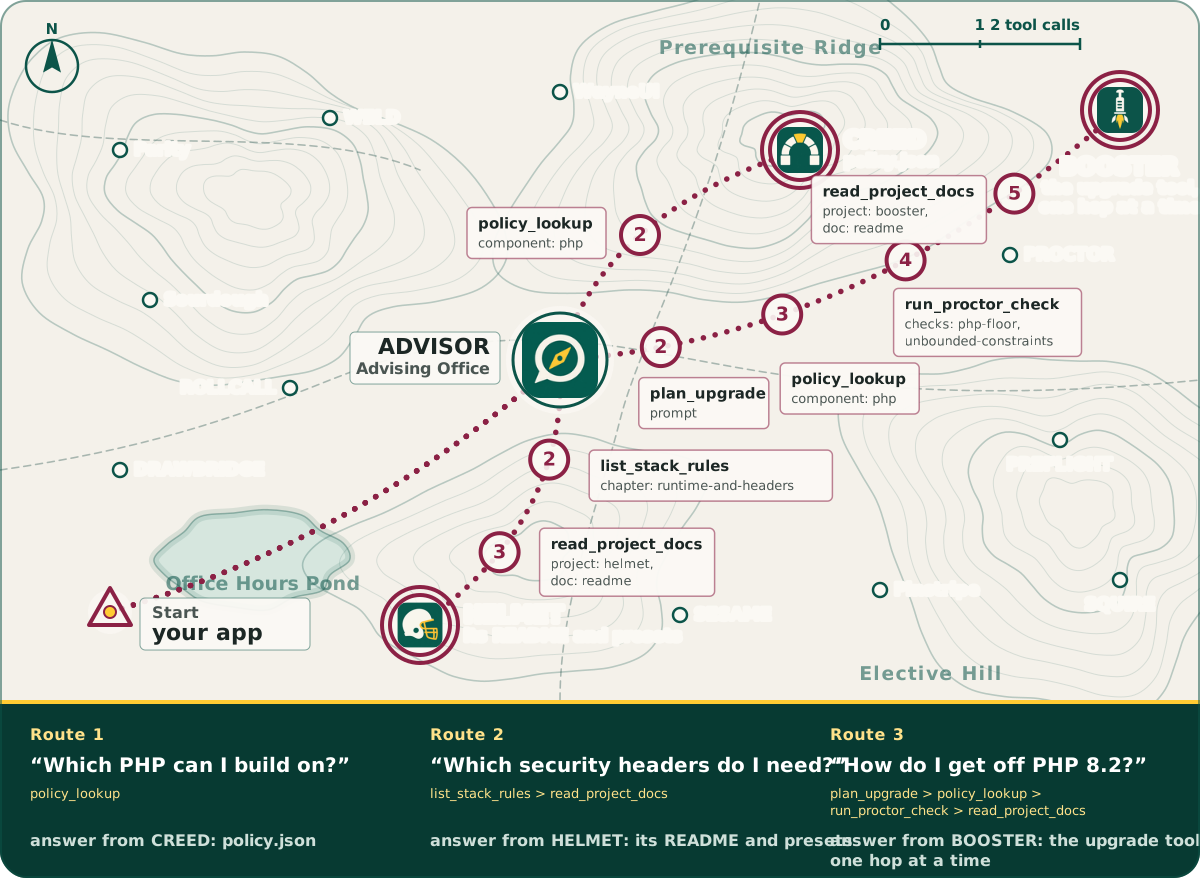
ADVISOR gives a coding agent nine read-only tools, plus two prompts and three resource routes, and each answer says where it came from.
Tools#
Nine tools, all read-only. Each one says where its answer came from:
| Tool | Does |
|---|---|
list_projects |
The stack's projects, WayneUI first, with built or proposed state, package and version. |
get_project_status |
One project: state, package, version, PHP constraint, its floor under today's policy, next step. |
read_project_docs |
A project's README, best practices, or (WayneUI only) markup contract and 1.x to 2.x migration guide, paged. |
policy_lookup |
Support state for a runtime or tool (and an optional version) from CREED, as of today, worked out by CREED's own reader (waynestate/creed), the one PROCTOR carries a copy of. A version older than every one the policy lists is answered as end of life, with a note. |
list_stack_rules |
CREED handbook rules, each with its file and line, filtered by app permutation, chapter and a word query (query: "session cookie"). |
owner_of |
Answers "which project owns X?" from the bundled ownership table, built from the stack's one-owner-per-rule decision first: the owner, its role, the projects around it, and the decision each answer comes from. Pass a topic or the whole question ("who owns composer audit"). |
playbook_lookup |
A shared value by key, or every key: an environment variable of the same name wins, then Playbook; secret-looking keys are refused. |
run_proctor_check |
Runs the app's own vendor/bin/proctor check against the bundled policy and returns the findings. |
upgrade_path |
Plans the app's PHP and/or Laravel upgrade, one supported hop at a time, via Booster's read-only plan. Inputs: from_php (the version the app runs today, when the project names none), to_php, to_laravel. |
Every tool also publishes an output schema in tools/list: the fields its structured answer holds, each one described, and nothing else. A client can read an answer without guessing, and the tests check every answer against its schema. The front page's field book shows a real answer from each tool.
Groups#
The groups split by what they may start: stack never starts a program, proctor starts the app's own vendor/bin/proctor, and booster starts Booster's read-only plan (never run). Set ADVISOR_GROUPS=stack when you want ADVISOR as pure reference material.
Resources#
| Resource | Serves |
|---|---|
advisor://policy |
CREED's policy file. |
advisor://creed/<chapter> |
One per handbook chapter. |
advisor://guide/<slug> |
Hand-written guides; the first is "Connect to Oracle on Citadel". |
Prompts#
Prompts: orient_me and plan_upgrade.
Here is what that looks like when you ask. Each numbered control point is one of the tools above, with the arguments the front page's own route table sends: